OAuth 2.0 in Entra ID · Part 1 of 7
OAuth in Entra ID, explained simply
OAuth is how an app gets permission to do something for you, without ever being handed your password. In Microsoft Entra ID, it is the standard behind almost every “Connect” button, consent screen and API call that a modern business app makes.
You have seen it many times. An app shows a Microsoft sign-in page, then a screen that says something like “This app would like to: Read your profile”. You click Accept, and the app just works.
This article explains what actually happened in that moment, in plain language, using one example from inside a company. No code, no specifications. By the end, you will know what OAuth is, why it exists, and why modern apps choose it over SAML.
The problem: an app needs your data
Meet Contoso Corp, a mid-sized company that uses Microsoft Entra ID for its user accounts. Contoso’s employees use an internal business app, which this article simply calls the OAuth app. Divya, an employee, wants the OAuth app to work with her company data, such as her profile and her colleagues’ details.
That data lives behind Microsoft Graph, the API that holds Entra ID data. The OAuth app cannot read it on its own. It needs someone’s permission.
The old way: share your password
Years ago, the fix was simple and dangerous. The app asked for your username and password, stored them, and signed in as you whenever it needed something. That is like handing a stranger your house keys so they can water one plant.
- Too much access. With your password, the app can do everything you can do, not just the one task it was built for.
- No end date. It keeps working until you change your password, and then every other app breaks too.
- No way to take it back. You cannot cancel one app’s access without cancelling everyone’s.
- Security controls are skipped. MFA and sign-in policies cannot protect a password typed into someone else’s app.
- One leak exposes everything. If the app is breached, your real password is breached with it.
OAuth was created to remove all five problems.
The idea: a visitor badge, not your house keys
OAuth replaces the password with a visitor badge issued by a trusted security desk. Picture Contoso’s office building.
- The OAuth app wants to enter the records room on Divya’s behalf.
- Instead of borrowing Divya’s keys, it goes to the security desk at reception.
- The desk checks Divya’s ID and asks her: “Do you allow this app to read your data for you?”
- Divya says yes. The desk hands the app a visitor badge.
- The badge opens only the records room, only for reading, and only for about an hour.
Divya never gave anyone her keys. The app got exactly what it needed and nothing more. If something looks wrong, security can cancel the badge without touching Divya’s keys.
That is OAuth. Entra ID is the security desk, and the badge is called an access token.
Meet the four players
Every OAuth exchange has the same four players. The official names sound complicated, but each one maps to something in the story.
| In the story | OAuth name | In Entra ID |
|---|---|---|
| Divya, the employee | Resource owner | A user account in the tenant |
| The OAuth app | Client | An App registration |
| The security desk | Authorization server | Entra ID (login.microsoftonline.com) |
| The records room | Resource server | Microsoft Graph, or your own API |
The important point is the separation. The app never talks to Divya’s password, only to the desk. The records room never trusts the app directly, only the badge the desk signed.
What is written on the badge
An access token answers four questions, and the records room checks all four before opening the door.
| Question | Badge says | Token term |
|---|---|---|
| Which door is it for? | The records room | Audience (aud): Microsoft Graph |
| What may it do there? | Read user profiles | Scopes (scp): User.ReadBasic.All |
| On whose behalf? | Divya | User (upn): divya.pillai@contoso… |
| Until when? | About one hour | Expiry (exp) |
Scopes: which rooms the badge opens
A scope is one named permission. User.ReadBasic.All means “read basic details of everyone in the directory”. User.Read.All means “read full details, including job title and manager”. An app should ask only for the scopes it truly needs.
Consent: who approves the badge
- User consent. Low-risk scopes, like reading basic profiles, can be approved by Divya herself.
- Admin consent. Powerful scopes, like reading everyone’s full details, need an administrator. Divya sees a “Need admin approval” screen instead.
The golden rule of delegation
A badge issued on Divya’s behalf can never open more than Divya herself could. If Divya cannot see something, neither can the app. The app’s real access is always the overlap of its scopes and the user’s own rights.
What happens when you click Connect
When Divya clicks Connect, eight quick steps run in a second or two. Only step 3 involves her, and her password goes only to Entra ID.
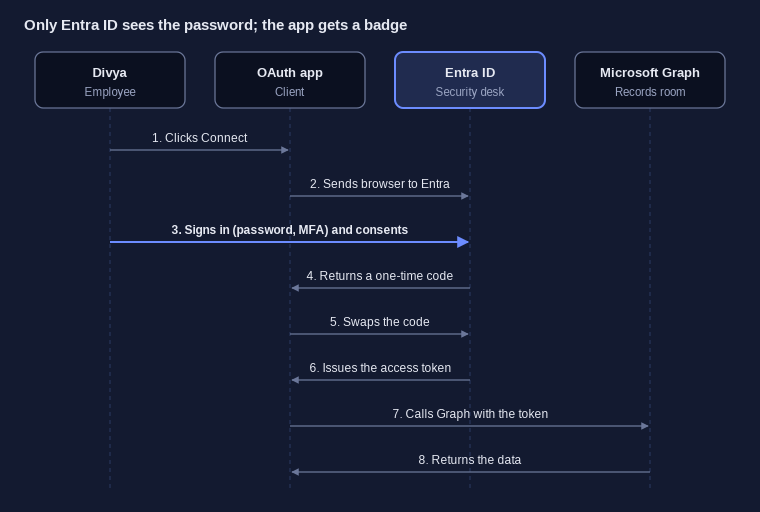
Why the extra swap in steps 4 to 6? The one-time code travels through the browser, where it could be seen. On its own it is useless: only the app that asked for it can trade it with Entra ID for the real badge. It works like a cloakroom ticket that only the owner can redeem.
This sequence is called the authorization code flow, the most common OAuth flow for apps used by people. It gets its own article next.
OAuth is about access, not identity
OAuth tells an app what it may do, not who you are. This surprises people, because they do sign in during the process.
The sign-in is for the security desk. Entra ID must know it is really Divya before it asks for her consent, so it checks her password, MFA and sign-in policies. But the app only receives a badge for the records room. It does not receive a verified ID card saying “this is Divya”.
That ID card is what OpenID Connect (OIDC) adds. OIDC is a thin layer built on top of OAuth. It gives the app a second token, the ID token, written for the app itself to read. Most apps use both together:
- OIDC answers “who signed in?”, so the app can show “Connected as Divya Pillai”.
- OAuth answers “what may this app do?”, so the app can call Microsoft Graph for her.
Microsoft’s sign-in libraries request both automatically. That is why the two are so often confused.
OAuth vs SAML: built for different jobs
SAML and OAuth are not really rivals. They were built to answer different questions, in different eras.
- SAML (2005) answers: “Should this person be let into this website?” Entra ID sends the website a signed XML note, called an assertion, vouching for the user. The website reads it and opens the door.
- OAuth 2.0 (2012) answers: “May this app do something on this person’s behalf?” Entra ID gives the app a badge it can show to an API, again and again, for a limited time.
In the building analogy, SAML is the receptionist phoning a department to say “Divya is genuine, let her in”. OAuth is the visitor badge an app carries to open a specific room.
| SAML | OAuth 2.0 (+ OIDC for sign-in) | |
|---|---|---|
| Main job | Sign a person into a web app | Let an app call APIs for a person |
| What the app receives | XML assertion about the user | Access token for an API (+ ID token) |
| Calling APIs | Not designed for it | Its core purpose |
| Mobile and desktop apps | Poor fit, browser forms only | Built in, with PKCE |
| Single-page web apps | Poor fit | Built in |
| Fine-grained permissions | No, all or nothing | Yes, scopes per API |
| Staying connected | Sign in again when the session ends | Refresh tokens renew access quietly |
| Format | Large XML documents | Compact JSON tokens |
| Typical Entra ID use | Older or SaaS web apps (e.g. Workday, ServiceNow) | Custom apps, APIs, mobile, Microsoft 365 integrations |
Why modern apps choose OAuth
Today’s apps rarely stop at “let the user in”. They call APIs: to read a directory, book a meeting, upload a file or talk to another service. SAML has no badge to carry to those APIs. OAuth does, with scopes, expiry and consent built in. Add OIDC on top, and the same flow also handles sign-in.
When SAML is still the right choice
SAML remains perfectly sound for signing users into an existing web application that supports it. Many enterprise SaaS products offer SAML first, and it works well in Entra ID. If the app only needs to know who you are, and never calls an API on your behalf, SAML is fine.
The practical rule: use SAML when the app only needs a login; use OAuth with OIDC when the app needs a login and access to data.
Remember these five points
- OAuth lets an app act for you without your password.
- Entra ID is the security desk. It signs you in, asks for consent and issues the badge.
- The access token is a badge with a door, a list of scopes, an owner and an expiry.
- An app can never do more than the user it acts for.
- OAuth handles access, OIDC adds identity, and SAML signs people into web apps.
Next in this series
There are several ways to get a badge, called flows or grants, each suited to a different kind of app. The next six parts take them one at a time, each using a Contoso employee directory app as the running example, with a hands-on lab in an Entra ID tenant:
- Authorization code flow with PKCE: a person signs in through a browser, the code is protected, and refresh tokens keep the app connected.
- Client credentials: a background job with no user at all.
- Device code flow: signing in on a device with no browser or keyboard.
- On-behalf-of: an API passing your badge to another API, plus the flows to avoid.