OAuth 2.0 in Entra ID · Part 7 of 7
Resource owner password credentials (ROPC): why it is retired, and what MFA does to it
The resource owner password credentials flow, usually called ROPC, is the last retired flow in this series, and the one Microsoft warns against most firmly. In every other flow the user types their password on Microsoft’s own sign-in page. In ROPC, the app collects the password itself and sends it straight to Entra ID. There is no sign-in page at all.
That single change removes the protections a sign-in page provides: multi-factor authentication, passwordless sign-in, and most Conditional Access. On a modern tenant with MFA enforced, ROPC simply stops working, and this part shows exactly where and why.
Like the implicit flow, ROPC is covered here so you can recognise it, prove it is unsafe, find it in your tenant, and replace it, not so you can build with it.
By the end you will have:
- seen how ROPC works and what it skips;
- watched it hit the MFA wall on a tenant like yours;
- learned how to find apps and accounts that may still use it;
- replaced it with the right flow for each case.
In plain words: telling the app your password
Think back to the security desk from Part 1. Normally you walk up to the desk, show your ID and do any extra check it asks for, and the desk hands the app a visitor badge. The app never sees how you proved who you are.
ROPC works differently. You tell the app your password, and the app walks up to the desk pretending to be you. The desk sees a correct password and issues a badge. That is convenient, and it is exactly the problem:
- The app now knows your password. It can keep it, log it or lose it.
- The desk never got to ask you for a second factor, because you were not there; the app was.
- You have been trained to type your password into an app, which is the habit every phishing attack depends on.
A real security desk would refuse: “I need the person here, and I need their second factor.” That refusal is what MFA does to ROPC, and it is the heart of this article.
The business requirement: Contoso’s legacy batch client
Contoso has a nightly PowerShell job that pulls a report from Microsoft Graph. It was written years ago and signs in as a service account, svc.reporting, whose password sits in a text file next to the script. The sign-in uses ROPC: the script reads the password and posts it to the token endpoint.
It stopped working the week MFA was enforced across the tenant. The owner’s first instinct was to exclude the service account from MFA to “get it running again”. Security asks the IAM team to handle it properly instead:
- Explain why the job broke, and why ROPC is the wrong tool, not MFA.
- Show what actually happens when a password-only sign-in meets MFA.
- Find any other apps or accounts in the tenant that may still use ROPC.
- Replace the job’s sign-in with a supported, password-free method.
| Requirement | Delivered by |
|---|---|
| Show the risk and the MFA wall | The lab: Invoke-RopcFlow.ps1 |
| Reasoned case against ROPC | The “why” and “what MFA does” sections below |
| Find other ROPC use | The gap checks: public client flows and sign-in logs |
| A safe replacement | The fix: client credentials or a managed identity |
The lesson the owner needed: the fix for a batch job is to stop using a password at all, not to weaken MFA.
How ROPC works
There are no redirects to draw, because there are none. Only three parties, and the password goes the wrong way.
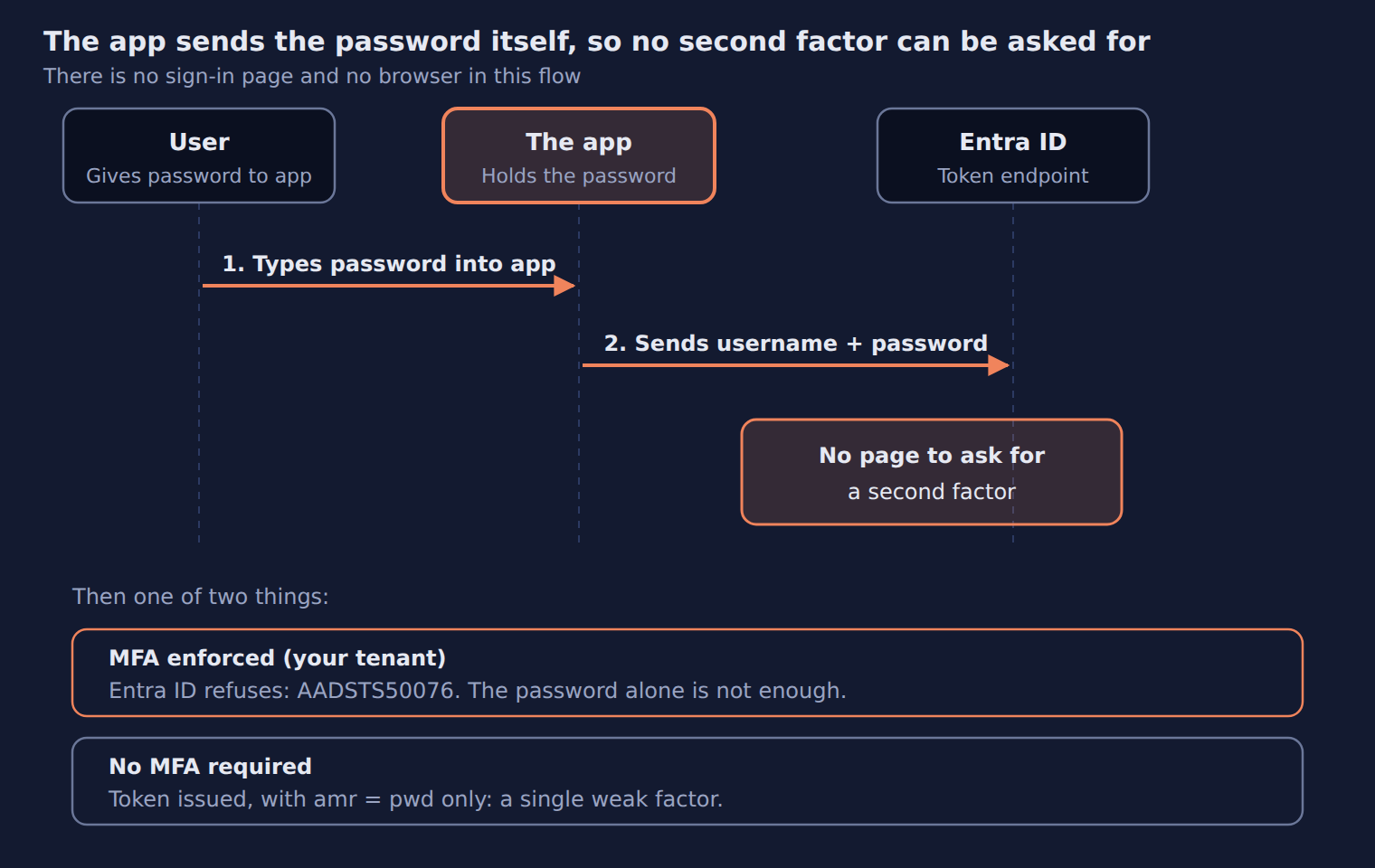
[embedded content: ROPC · the password goes to the app, and MFA cannot run]
- Types password into app. The user hands the app their real username and password. In the batch job, the “user” is a service account and the password sits in a file.
- Sends username + password. The app posts them to Entra ID’s token endpoint with
grant_type=password. No sign-in page is shown, and no browser is involved. - No page to ask for a second factor. Because the user is not present at a Microsoft page, Entra ID has no way to prompt for MFA or run interactive Conditional Access.
What happens next depends entirely on whether a second factor is required, which is the subject of the next section.
Why Microsoft does not recommend it
Microsoft’s own documentation tells developers to avoid ROPC, and the wider standards agree: RFC 9700 (OAuth 2.0 Security Best Current Practice) says the password grant must not be used, and OAuth 2.1 removes it. The reasons:
| # | Problem | Why it matters |
|---|---|---|
| 1 | The app handles the real password | It can be logged, cached, stored in a file (as in the batch job) or stolen if the app is compromised |
| 2 | MFA cannot run | There is no interface to prompt for a second factor, so a password-only sign-in is all ROPC can ever do |
| 3 | Most Conditional Access is bypassed | Controls that need an interactive sign-in, such as device compliance, sign-in risk and session limits, never get a chance to apply |
| 4 | No passwordless or FIDO2 | ROPC only understands a password, so modern, stronger sign-in methods are unavailable |
| 5 | It teaches the phishing habit | Users learn to type their password into an application instead of Microsoft’s page, which is exactly what attackers want |
| 6 | It barely works anymore | It fails for guests, federated users, personal accounts and any account with MFA; it is a shrinking island of support |
These were understood trade-offs for a narrow set of legacy clients. On a tenant with MFA enforced, they are no longer trade-offs: problem 2 alone stops the flow dead.
What happens when MFA is in place
This is the part that matters on your tenant, where Microsoft enforces MFA by default.
ROPC sends only a password. When Entra ID decides a second factor is required, it has no way to ask for one, because the user is not there, so it refuses the token request. The call fails with:
AADSTS50076: Due to a configuration change made by your administrator, or because you moved to a new location, you must use multi-factor authentication to access the resource.
The same account can sign in perfectly well in a browser, because the browser can show the MFA prompt. ROPC cannot, so the password alone is not enough.
The two outcomes
| Tenant state | ROPC result | What it tells you |
|---|---|---|
| MFA enforced (security defaults or a Conditional Access policy) | Fails with AADSTS50076 | ROPC is blocked. The only way to “fix” it is to weaken MFA, which you must not do |
| MFA not required for the account | Succeeds, token issued | The token shows amr: pwd only: a single, weak factor, with nothing stronger behind it |
The failure is the healthy outcome. It means an attacker who steals svc.reporting’s password still cannot sign in, because they cannot pass MFA. The moment someone excludes the account from MFA to make ROPC work again, that protection is gone: the stored password becomes a complete set of keys.
Why excluding the account is the wrong fix
| “Fix” | What it really does |
|---|---|
| Exclude the service account from MFA | Restores ROPC, and removes the one control stopping a stolen password from working. A bad trade |
| Keep the password in a vault, still ROPC | Protects the password at rest, but the sign-in is still password-only and MFA still cannot run |
| Move the job to client credentials or a managed identity | No password at all, nothing to steal, and MFA is irrelevant because no human factor is involved |
The right answer is the last row. The job never needed a person, so it never needed a password.
ROPC vs the flow you should use instead
| ROPC (retired) | What to use instead | |
|---|---|---|
| Who types the password | The app | Nobody types it into the app; the user types it on Entra ID’s page, or there is no user |
grant_type | password | authorization_code, device_code, or client_credentials |
| MFA | Cannot run | Fully supported |
| Conditional Access | Mostly bypassed | Fully applied |
| Credential stored by the app | The user’s password | A certificate or nothing (managed identity) |
| Fit: user at a browser | — | Authorization code + PKCE (Part 2) |
| Fit: user, no browser | — | Device code (Part 4) |
| Fit: background job, no user | — | Client credentials (Part 3), ideally a managed identity |
The batch job in this article has no user, so its correct replacement is client credentials, and better still a managed identity when it runs in Azure, which removes the stored secret entirely.
Implementation: watch it hit the MFA wall
On your tenant, with MFA enforced by default, this lab is designed to fail at step 2, and that failure is the result you want to capture.
Step 1. Register the legacy batch client
- App registrations → New registration:
Contoso Legacy Batch Client, single tenant. - Authentication → Advanced settings → Allow public client flows → Yes → Save. ROPC needs this; it is also the setting the gap check looks for.
- API permissions: keep the default delegated
User.Read. - Note the Application (client) ID.
Step 2. Use a throwaway test user
Use a cloud-only test account you can delete afterwards, never a real or admin account, and never svc.reporting itself. Do not store its password; you will type it once at the prompt. On your tenant this account has MFA enforced, which is exactly what the lab needs.
Step 3. Run the demo
.\Invoke-RopcFlow.ps1 -TenantId <tenant-id> -ClientId <client-id> -UserName test.user@contoso.onmicrosoft.com
The script prompts for the password, then posts it with grant_type=password:
POST https://login.microsoftonline.com/<tenant>/oauth2/v2.0/token
  client_id=<client-id>
  grant_type=password
  username=test.user@contoso.onmicrosoft.com
  password=<typed at the prompt>
  scope=openid profile User.Read offline_access
Step 4. The expected result on your tenant
[2] Send grant_type=password with the username and password to /token
  Entra ID refused the password grant:
    invalid_grant: AADSTS50076: ... you must use multi-factor authentication ...
  RISK: This failure IS the lesson: MFA is required, and ROPC cannot do MFA.
That is success for this lab. The password was correct, and the sign-in was still refused, because a password on its own is not enough. If the account were not covered by MFA, the script would instead print a token whose amr claim is pwd only, proving a single weak factor. Your tenant does not allow that, which is the healthy state.
Identify ROPC use in your tenant
ROPC is harder to find than the implicit flow, because there is no checkbox that says “uses ROPC”. You infer it from three signals.
Gap check 1: public client flows enabled
ROPC only works on apps where Allow public client flows is Yes. That setting is also used by the device code flow, so it is a list of candidates, not proof. Review each one and ask what it actually uses the setting for.
# Apps with public client flows enabled (requires Application.Read.All)
Connect-MgGraph -Scopes "Application.Read.All" -NoWelcome
Get-MgApplication -All -Property "displayName,appId,isFallbackPublicClient,publicClient" |
  Where-Object { $_.IsFallbackPublicClient -eq $true } |
  Select-Object displayName, appId |
  Sort-Object displayName
A device-code CLI legitimately needs this setting; a nightly batch client almost certainly should not.
Gap check 2: sign-in logs
In Sign-in logs, add the column or filter for Authentication protocol or Incoming token type, and look for sign-ins marked ROPC. These are the clearest evidence, because they show ROPC was actually used, not just allowed.
| Signal in the logs | Meaning |
|---|---|
| Authentication protocol: ROPC | The app used the password grant |
A service or user account signing in with no interactive step and amr: pwd only | Likely a ROPC or other non-interactive password sign-in |
| Repeated sign-ins on a fixed schedule from a server IP | A batch job; check how it authenticates |
Gap check 3: the code and stored secrets
For each candidate app or script, look for the tell-tale request and stored passwords.
| You find | Meaning |
|---|---|
grant_type=password in the code or a captured request | ROPC |
| A username and a password in a config file, script argument or scheduled task | A password-based sign-in that should be replaced |
Get-Credential or a stored PSCredential feeding a token request | Often ROPC behind the scenes |
The gap register
| App / script | Public client flows | ROPC in logs | Password stored | Owner | Decision |
|---|---|---|---|---|---|
| Contoso Legacy Batch Client | Yes | Yes | Yes, in a file | IAM team | Move to client credentials / managed identity |
| Example: device-code CLI | Yes | No | No | Platform team | Keep: uses device code, not ROPC |
The fix: replace ROPC by scenario
Pick the replacement by asking one question: is a person involved?
| Scenario | Replace ROPC with | Why |
|---|---|---|
| A person at a browser | Authorization code + PKCE (Part 2) | They sign in on Entra ID’s page; MFA and Conditional Access apply |
| A person, device with no browser | Device code (Part 4) | They sign in on their phone; the device never sees the password |
| A background job, no person | Client credentials (Part 3) | The app authenticates as itself, with a certificate |
| A background job running in Azure | Managed identity | Azure provides and rotates the credential; nothing is stored at all |
Migrating the Contoso batch job
The job has no user, so it moves to client credentials, and to a managed identity if it runs in Azure Automation or a Function.
- Create or reuse an app registration for the job (or enable a managed identity on the Azure resource).
- Grant application permissions for exactly what the report needs, for example
User.Read.AllorReports.Read.All, and admin consent them. - Add a certificate to the app, or rely on the managed identity, so there is no secret to store. Remove the password file.
- Change the script to request a token with
grant_type=client_credentialsand scopehttps://graph.microsoft.com/.default, as in Part 3, or to use the managed identity endpoint. - Disable or delete the
svc.reportingaccount once nothing uses it, and set Allow public client flows back to No on the old app. - Confirm in the sign-in logs that the job now appears under service principal sign-ins, not as a user password sign-in.
The outcome: no password anywhere, MFA is no longer even relevant to the job, and the account that worried security is gone.
Troubleshooting and error codes
In ROPC, most of these “errors” are the system protecting the account. Read them as signals, not bugs.
| Error code | Meaning | What it tells you |
|---|---|---|
AADSTS50076 | MFA is required for this resource | The main lesson: ROPC cannot do MFA, so the sign-in is correctly refused |
AADSTS50079 | The user must register for MFA | Same story: a second factor is needed and ROPC cannot provide it |
AADSTS53003 | Conditional Access blocked the sign-in | A policy stopped it; many CA controls can’t run in ROPC at all |
AADSTS50126 | Wrong username or password | A plain credential error for the test account |
AADSTS7000218 | Request needs a client assertion or secret | Allow public client flows is not enabled on the app |
AADSTS50034 | The user does not exist in this tenant | Wrong username or wrong tenant |
AADSTS65001 | Consent missing | The app or user has not consented to the scope |
AADSTS50053 / 50055 | Account locked or password expired | The credential itself is unusable |
If you see a token instead of an error, the account is not covered by MFA. Note it down: that account is a weak point to fix, not a configuration to copy.
Checklist
- No new app uses ROPC;
grant_type=passworddoes not appear in any current code. - Apps with Allow public client flows enabled reviewed; the setting left on only for genuine device-code or broker apps.
- Sign-in logs checked for the ROPC protocol; any hits traced to an app and an owner.
- No passwords stored in files, scripts, scheduled tasks or vaults for sign-in purposes.
- Service accounts using ROPC moved to client credentials or, in Azure, managed identities.
- MFA left enforced; no account excluded just to keep ROPC working.
- Retired
svc.reporting-style accounts disabled once nothing uses them. - Lab app cleaned up: public client flows set back to No, or the registration deleted; test user removed.
Remember
- ROPC means the app collects the password, so there is no sign-in page and no second factor.
- On a tenant with MFA enforced, ROPC fails with
AADSTS50076, and that failure is the system working correctly. - Excluding an account from MFA to fix ROPC is the wrong move: it removes the protection that stops a stolen password.
- A batch job never needed a password; move it to client credentials or a managed identity.
- Find ROPC through public client flows, the sign-in logs, and stored passwords, since there is no single setting that names it.
The OAuth series at a glance
| Part | Flow | One-line rule |
|---|---|---|
| 1 | The idea | A badge instead of your password |
| 2 | Authorization code + PKCE, refresh tokens | A person with a browser |
| 3 | Client credentials | No person at all |
| 4 | Device code | A person, but no browser on the device |
| 5 | On-behalf-of | An API calling another API for the person |
| 6 | Leave request end to end | One sign-in, three tokens, a real business flow |
| 7 | Implicit (retired) | Find it and replace it with authorization code + PKCE |
| 8 | Password / ROPC (retired) | The app must never hold the password; move to a password-free flow |