OAuth 2.0 in Entra ID · Part 6 of 7
The implicit flow: why it is retired and how to find it in your tenant
The implicit flow is the one OAuth flow in this series you should not build with. It was designed for browser apps in 2012, when browsers had no safe way to swap a code for a token, so Entra ID simply put the token in the address bar. Browsers solved that problem years ago, and the flow has been retired ever since.
It has not disappeared, though. Many tenants still have older single-page apps, intranet widgets and SharePoint add-ins that use it, because nobody went back to change them.
This part treats the implicit flow the way an IAM engineer would:
- Understand how it works and where the token leaks.
- Prove the risk with a lab: capture a token from the address bar and reuse it from another program.
- Find every app in your tenant that still allows it.
- Retire it by moving each app to the authorization code flow with PKCE.
In plain words: the coat handed over in the street
In Part 2, the authorization code flow worked like a cloakroom. You received a ticket first, and only the person holding the ticket and the secret half could swap it for the coat at the counter.
The implicit flow skips the counter. The attendant walks out and hands your coat over in the street, in full view. It reaches you quickly, but anyone standing nearby sees it, and anyone who grabs it can walk away with it. There is no ticket to check and no secret to match.
| Authorization code + PKCE | Implicit | |
|---|---|---|
| What arrives in the browser | A ticket (code) | The coat itself (access token) |
| Where it arrives | The address bar, but useless alone | The address bar, ready to use |
| Protection if someone sees it | The secret half (PKCE) | None |
| Getting a new one later | Renewal slip (refresh token) | Go back to the cloakroom (sign in again) |
The business requirement: Contoso’s legacy intranet widget
Contoso’s intranet has a Who’s in today widget, built in 2016 as a browser-only app. It signs employees in and reads their profile from Microsoft Graph. It still works, so nobody has touched it.
After a security review, Contoso’s security team sends the IAM team this request:
- Show us the risk: what can actually go wrong with this widget?
- Find every app in our tenant that still allows the implicit grant.
- Migrate them to the authorization code flow with PKCE, then switch the implicit grant off.
| Requirement | Delivered by |
|---|---|
| Demonstrate the risk | The lab: Invoke-ImplicitFlow.ps1 |
| Inventory of affected apps | The audit: Find-ImplicitGrantApps.ps1 |
| Safe migration with rollback | The fix: MSAL.js 2+ in the app, Convert-ImplicitAppToSpa.ps1 in Entra ID |
| Proof that it is done | Re-running the audit, and checking the sign-in logs |
How the implicit flow works, and where the token leaks
Invoke-ImplicitFlow.ps1
Find-ImplicitGrantApps.ps1
Convert-ImplicitAppToSpa.ps1
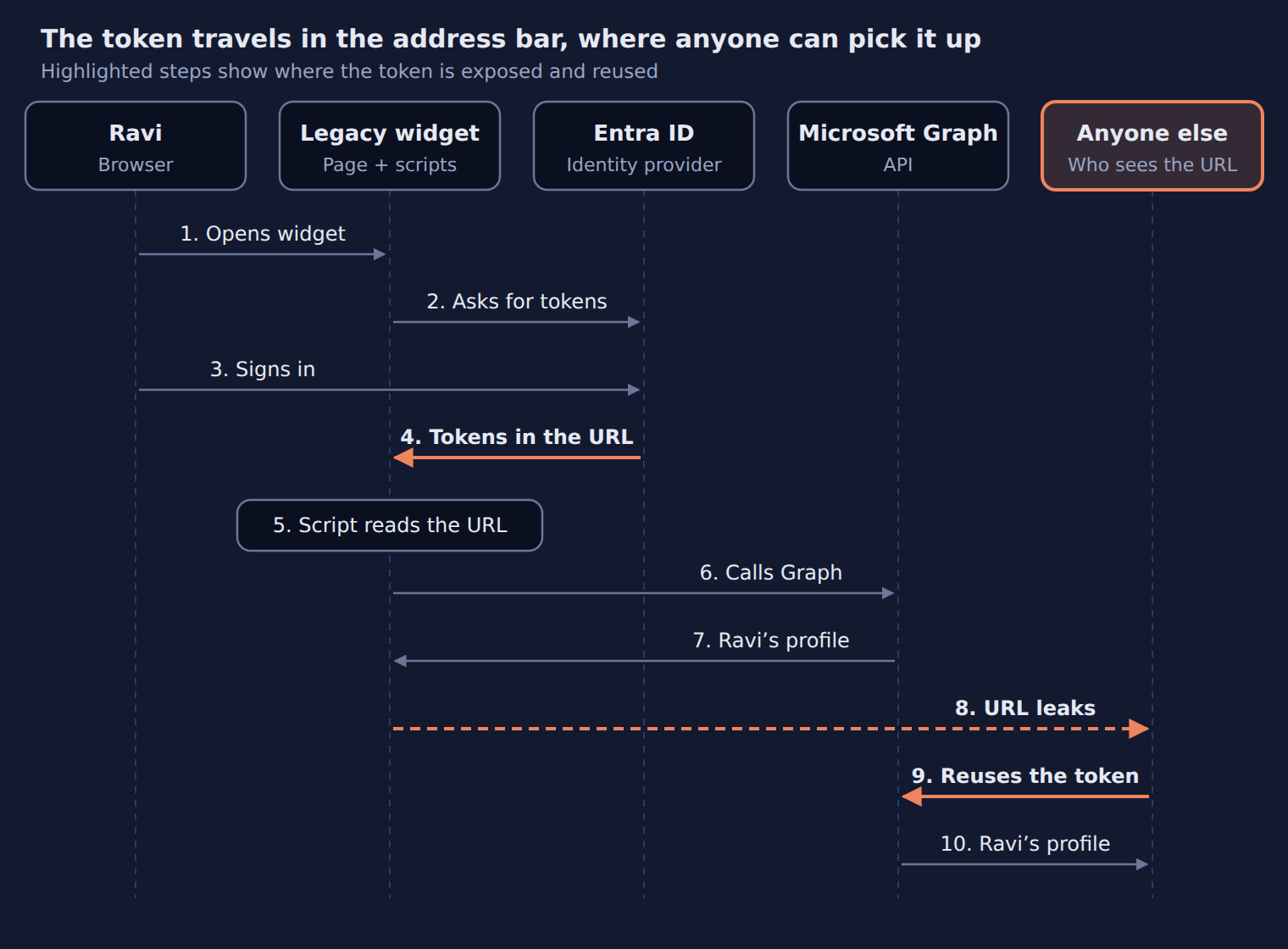
The first seven steps are the flow working as designed. Steps 8 to 10 are what the design allows.
[embedded content: Implicit flow · where the token leaks]
- Opens widget. Ravi opens the intranet page.
- Asks for tokens. The widget sends the browser to
/authorizewithresponse_type=id_token token. There is no PKCE challenge, because there will be no code to protect. - Signs in. Entra ID checks Ravi’s password, MFA and Conditional Access.
- Tokens in the URL. Entra ID redirects back with the access token and ID token in the URL fragment:
…/widget#access_token=eyJ…&id_token=eyJ…. - Script reads the URL. JavaScript on the page reads
location.hashand keeps the tokens. - Calls Graph. The widget calls Microsoft Graph with the access token.
- Ravi’s profile. Graph returns the data.
- URL leaks. The same address is visible to every script and extension on the page, is saved in browser history, and can leak through the Referer header.
- Reuses the token. Whoever has the URL sends the access token to Graph from anywhere. Nothing ties it to the widget.
- Ravi’s profile. Graph accepts it, because a bearer token works for whoever bears it, until it expires.
An hour later the token expires. There is no refresh token, so the widget has to send Ravi back to Entra ID, and the cycle repeats.
Why Microsoft no longer recommends it
Microsoft’s guidance for browser apps is the authorization code flow with PKCE, and MSAL.js 2 and later no longer support the implicit flow at all. The wider OAuth community agrees: the IETF’s OAuth 2.0 Security Best Current Practice (RFC 9700) says clients should not use the implicit grant, and the draft OAuth 2.1 removes it entirely.
The reasons fall into five groups.
| # | Problem | What actually happens |
|---|---|---|
| 1 | Token in the URL | The access token sits in the address bar. URLs end up in browser history, can be synced across devices, and are easy to copy into tickets or chat by mistake |
| 2 | Readable by any script | Every script on the page, including third-party libraries, injected code (XSS) and browser extensions, can read location.hash |
| 3 | Leaks to other sites | If the page loads content or links to another site before the URL is cleaned, the address can leak through the Referer header or redirects |
| 4 | Nothing binds the token to the app | There is no code swap and no PKCE, so a token taken from the URL works for anyone, from any program, until it expires |
| 5 | No refresh token | The app cannot renew quietly. It used hidden iframes to get new tokens, which modern browsers break by blocking third-party cookies |
None of these existed by mistake. In 2012 they were accepted trade-offs, because browsers could not make cross-site requests to a token endpoint. Once browsers gained CORS and the Web Crypto API, the authorization code flow with PKCE could run safely in the browser, and the trade-offs were no longer necessary.
Implicit vs authorization code with PKCE
| Implicit | Authorization code + PKCE | |
|---|---|---|
response_type | token or id_token token | code |
| What the browser receives | Access token and ID token | A one-time code |
| Where tokens are delivered | URL fragment (#access_token=…) | Response body of a /token request |
| Code swap | None | Yes, with the PKCE verifier |
| If the redirect URL leaks | Attacker has a working token | Attacker has a useless code |
| Refresh token | Never | Yes, with offline_access |
| Renewal | Hidden iframe, broken by modern browsers | Refresh token request |
| Entra ID platform | Web, with Implicit grant ticked | Single-page application |
| Microsoft library | ADAL.js, MSAL.js 1.x | MSAL.js 2 and later (@azure/msal-browser) |
| Status | Retired | Recommended |
The change for the user is invisible: the same sign-in page, the same result. The change underneath is complete: the token never travels through the address bar.
Implementation: prove the risk in a lab
The lab recreates the legacy widget, signs Ravi in with the implicit flow, captures his token from the address bar and reuses it from another program. It takes about ten minutes.
Step 1. Register the legacy widget
- App registrations → New registration:
Contoso Legacy Intranet Widget, single tenant. - Authentication → Add a platform → Web → redirect URI
http://localhost:5000/implicit. - Under Implicit grant and hybrid flows, tick Access tokens and ID tokens → Save.
- API permissions: keep the default delegated
User.Readon Microsoft Graph. - Note the Application (client) ID.
The portal shows a warning when you tick these boxes. That warning is the point of the lab: leave the boxes ticked only while you test.
Step 2. Run the demo
.\Invoke-ImplicitFlow.ps1 -TenantId <tenant-id> -ClientId <widget-app-id>
Sign in as Ravi in the browser that opens. The script builds the request with response_type=id_token token and no PKCE challenge:
https://login.microsoftonline.com/<tenant>/oauth2/v2.0/authorize
  ?client_id=<widget-app-id>
  &response_type=id_token token
  &response_mode=fragment
  &redirect_uri=http://localhost:5000/implicit
  &scope=openid profile User.Read
  &state=...&nonce=...
After sign-in, the browser lands on an address like this:
http://localhost:5000/implicit#access_token=eyJ0eXAi...&token_type=Bearer&expires_in=4799&id_token=eyJ0eXAi...&state=...
The small page served by the script reads that address with JavaScript and posts it to the PowerShell window, exactly as any script on a real page could.
Step 3. Read what the demo proves
| Step in the script | What you see | What it proves |
|---|---|---|
| 1. Build the request | response_type=id_token token, no code_challenge | The app asks for tokens directly, with no PKCE |
3. Browser arrives at /implicit | The server receives an empty query string | Tokens in the #fragment never reach a server, so only page scripts handle them |
| 3. Page posts the fragment | access_token, id_token, expires_in, state printed in PowerShell | Any script on the page can read and send the token |
| 4. What is missing | No code, no refresh_token | No code swap to protect, no quiet renewal |
| 5. Decode the tokens | ID token for the widget; access token for Graph with scp: User.Read | Normal-looking tokens, valid for about an hour |
| 6. Reuse from PowerShell | GET /me returns Ravi | A token taken from the URL works from any program |
Step 6 is the one to remember. PowerShell is not the widget, yet the token works. An attacker who captures it from a browser extension, a shared screenshot or browser history can do the same.
Step 4. Look at the sign-in logs
Entra admin center → Sign-in logs → User sign-ins (interactive) → Add filter → Application → Contoso Legacy Intranet Widget.
| What you will see | Why |
|---|---|
| Interactive sign-ins only | The implicit flow always goes through the Entra ID sign-in page |
| Sometimes an Interrupted row just before a Success | The sign-in paused for a user step, such as Stay signed in?, the account picker or MFA |
| Resource: Microsoft Graph | The access token was issued for Graph |
| No entries under User sign-ins (non-interactive) | There is no refresh token, so the app never renews quietly |
The sign-in log has no field that says implicit flow. You recognise it from the pattern: interactive sign-ins only, to an app that has the implicit grant enabled. The next section turns that into a repeatable check.
Identify the gaps in your tenant
Three places tell you whether the implicit flow is still in use. Check them in this order: configuration finds every candidate, sign-in logs show which ones are really used, and the code confirms how.
Gap check 1: app configuration
Any app registration with Access tokens or ID tokens ticked under Implicit grant and hybrid flows can still use the flow. The audit script lists them all:
.\Find-ImplicitGrantApps.ps1
It needs Application.Read.All, and saves a CSV with each app’s name, client ID, which boxes are ticked, redirect URIs and owners.
| Ticked | Risk | Typical cause |
|---|---|---|
| Access tokens | High: access tokens travel in the URL | An app built with ADAL.js or MSAL.js 1.x |
| ID tokens only | Lower: only the sign-in token travels in the URL | Older server apps using the hybrid sign-in (code id_token), or a box ticked “just in case” |
| Neither | None | Already migrated, or never used it |
Apps with no owner deserve extra attention: nobody may know whether they are still needed.
Gap check 2: sign-in logs
For each app from the audit, open Sign-in logs, filter by the application and widen the date range to 30 days.
| What you find | What it means | Action |
|---|---|---|
| No sign-ins at all | The app is probably unused | Confirm with the owner, then switch the implicit grant off, or delete the app |
| Interactive sign-ins only, frequent | Live app, likely using the implicit flow | Migrate the code first, then switch the grant off |
| Both interactive and non-interactive sign-ins | The app may already use a code flow with refresh tokens | Check the code; the box may simply be left ticked |
Gap check 3: the app’s code or network traffic
Open the app in a browser with the developer tools’ Network tab, sign in, and look at the request to /authorize.
| You see | Flow |
|---|---|
response_type=token or id_token token | Implicit |
response_type=code with code_challenge | Authorization code + PKCE |
adal.js, adal-angular, or msal.js version 1.x loaded | A library that uses the implicit flow |
@azure/msal-browser loaded | MSAL.js 2 or later, which uses authorization code + PKCE |
The gap register
Combine the three checks into one row per app:
| App | Implicit ticked | Signed in last 30 days | Library found | Owner | Decision |
|---|---|---|---|---|---|
| Contoso Legacy Intranet Widget | Access + ID tokens | Yes, interactive only | MSAL.js 1.x | IAM team | Migrate |
| Example: Old HR form | ID tokens only | No | Unknown | None | Confirm, then switch off |
The fix: move each app to authorization code + PKCE
The migration has two halves that must go live together: the app’s code, and its Entra ID settings. Old MSAL.js 1 or ADAL.js code needs the Web platform with the implicit grant on; new MSAL.js 2+ code needs the Single-page application platform. Change one without the other and sign-in breaks until both match.
Half 1: the code
Replace the old library with @azure/msal-browser. The application code changes very little.
Before: MSAL.js 1.x, implicit flow
const app = new Msal.UserAgentApplication({
  auth: { clientId: "<client-id>", authority: "https://login.microsoftonline.com/<tenant-id>",
          redirectUri: "https://intranet.contoso.com/widget" }
});
await app.loginPopup({ scopes: ["User.Read"] });
const r = await app.acquireTokenSilent({ scopes: ["User.Read"] });   // hidden iframe
After: MSAL.js 2+, authorization code + PKCE
const pca = new msal.PublicClientApplication({
  auth: { clientId: "<client-id>", authority: "https://login.microsoftonline.com/<tenant-id>",
          redirectUri: "https://intranet.contoso.com/widget" },
  cache: { cacheLocation: "sessionStorage" }
});
await pca.initialize();                 // required in version 3 and later
await pca.handleRedirectPromise();      // completes sign-in after the redirect
await pca.loginRedirect({ scopes: ["User.Read"] });
const r = await pca.acquireTokenSilent({ scopes: ["User.Read"], account: pca.getAllAccounts()[0] });
| MSAL.js 1.x | MSAL.js 2+ | |
|---|---|---|
| Main class | UserAgentApplication | PublicClientApplication |
| Sign-in response | Tokens in the URL | A code, swapped with the PKCE verifier |
| Quiet renewal | Hidden iframe | Refresh token |
| Extra calls | None | initialize() (v3+), handleRedirectPromise() on every page load |
The Employee Directory page from Part 2 is a complete working example of the after side.
Half 2: Entra ID
Convert-ImplicitAppToSpa.ps1 makes the Entra ID change for one app, with a backup and a one-line rollback:
# Preview: nothing changes
.\Convert-ImplicitAppToSpa.ps1 -AppId <client-id> -WhatIf

# Move the Web redirect URIs to Single-page application and switch the implicit grant off
.\Convert-ImplicitAppToSpa.ps1 -AppId <client-id>

# Roll back from the backup file it printed
.\Convert-ImplicitAppToSpa.ps1 -RestoreFrom .\backup-<client-id>-<date>.json
It needs Application.ReadWrite.All. The same change by hand: Authentication → add the redirect URI under Single-page application, remove it from Web, untick both implicit grant boxes, Save.
The migration in order
- Inventory: run
Find-ImplicitGrantApps.ps1and build the gap register. - Retire the unused: apps with no sign-ins in 30 days get the implicit grant switched off, or are deleted after the owner agrees.
- Update the code of each live app to MSAL.js 2+ and test it in a test tenant or with a test registration.
- Release together: deploy the new code and run
Convert-ImplicitAppToSpa.ps1in the same change window. - Verify: sign in, wait an hour for a silent renewal, and check for non-interactive sign-ins in the logs.
- Confirm: re-run
Find-ImplicitGrantApps.ps1. The app should be gone from the report.
In the lab, run Invoke-ImplicitFlow.ps1 again after step 4. Entra ID now refuses the request: the implicit flow is switched off for that app.
Troubleshooting
| Error or symptom | When | Cause | Fix |
|---|---|---|---|
AADSTS700054: response_type is not enabled for the application | Running the demo, or old code after migration | The implicit grant boxes are not ticked | In the lab, tick them. After migration this is the expected result: the old flow is off |
AADSTS50011: reply URL does not match | Sign-in | Redirect URI missing, mistyped, or on the wrong platform | Demo: http://localhost:5000/implicit under Web. Migrated app: its URI under Single-page application |
AADSTS9002326: cross-origin token redemption is permitted only for the Single-Page Application client type | MSAL.js 2+ after deploying new code | The redirect URI is still under Web | Run Convert-ImplicitAppToSpa.ps1, or move the URI to Single-page application |
| Page shows the address but nothing reaches PowerShell | Demo | The page was opened from a bookmark or a different port | Run the script again and use the browser it opens |
| Signed out every hour after migration | Migrated app | acquireTokenSilent not used, or offline_access blocked | Call acquireTokenSilent before each API call; MSAL requests offline_access automatically |
Find-ImplicitGrantApps.ps1 returns nothing | Audit | No app has the grant ticked, or the account lacks Application.Read.All | Check the consent prompt; an empty result after migration is the goal |
Checklist
-
Find-ImplicitGrantApps.ps1run, and every result entered in the gap register. - Each app checked in the sign-in logs for the last 30 days.
- Unused apps: implicit grant switched off, or the app removed with the owner’s agreement.
- Live apps: code moved to MSAL.js 2+ and tested.
- Entra ID settings changed in the same release: redirect URIs under Single-page application, implicit grant boxes unticked.
- Silent renewal verified: non-interactive sign-ins appear in the logs.
- Audit re-run: the app no longer appears.
- New app registrations reviewed so nobody ticks the implicit grant boxes again.
- Lab widget cleaned up: implicit grant unticked, or the registration deleted.
Remember
- The implicit flow puts the access token in the address bar, where history, extensions and scripts can see it.
- A token taken from the URL works from any program: nothing binds it to the app.
- There is no refresh token, and the hidden-iframe renewal it relied on no longer works in modern browsers.
- Find it with the app configuration, confirm with the sign-in logs, and check the code.
- Fix it by moving to MSAL.js 2+ and the Single-page application platform in the same release.
The OAuth series at a glance
| Part | Flow | One-line rule |
|---|---|---|
| 1 | The idea | A badge instead of your password |
| 2 | Authorization code + PKCE, refresh tokens | A person with a browser |
| 3 | Client credentials | No person at all |
| 4 | Device code | A person, but no browser on the device |
| 5 | On-behalf-of | An API calling another API for the person |
| 6 | Leave request end to end | One sign-in, three tokens, a real business flow |
| 7 | Implicit (retired) | Find it and replace it with authorization code + PKCE |